
Point the Camera at the Label
Technicians type serial numbers and model codes into a phone outdoors, in gloves. With AI field scanning they photograph the label instead and the value lands in the field. It sits alongside barcode, VIN and licence-plate scanning as a fourth camera helper — for when there is no barcode, only printed text.
How it works
- 1
An admin writes the instruction
On a field of the task type, an administrator adds a plain-language instruction — literally "Read the serial number from the label".
- 2
The technician takes the photo
In the mobile app the technician photographs the label and picks that instruction from the list.
- 3
The value fills the field
The value is extracted from the photo and written into the field, ready to check and submit.
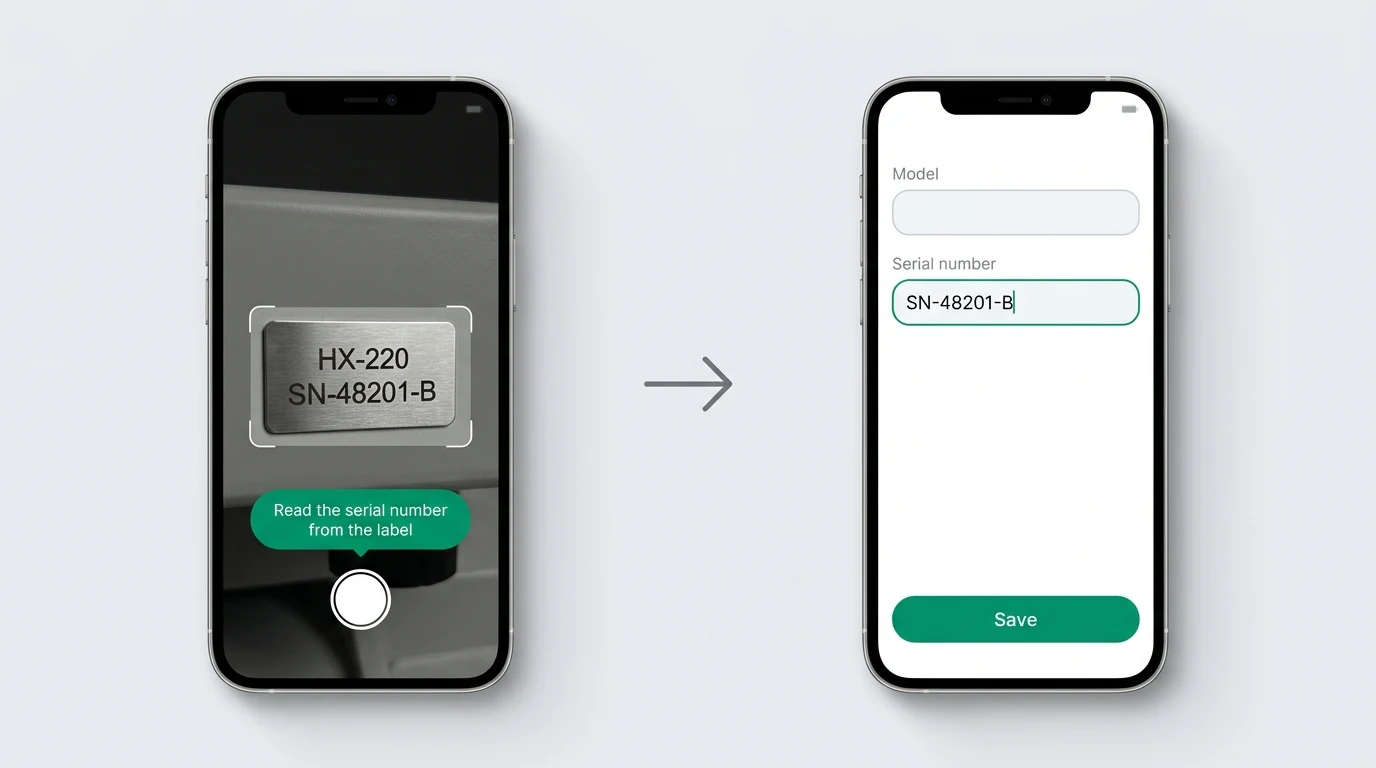
It reads what you asked for, in plain words
The instruction is ordinary language, so the same photograph can yield a serial number or a model name depending on which instruction the technician picks. You are not limited to a fixed list of things the camera knows how to find.
Afterwards it is just text
Once the value is in the field it is an ordinary text value. Reports, exports, history and search treat it exactly like something typed by hand, and the technician can correct it like any other text field. Nothing downstream changes.
AI scanning is metered. Use is permission-controlled, with monthly budgets set per account and per user, so you decide who can scan and how much. It is not unlimited.
Scanning happens in the mobile app, on text fields of a task type. For the full field list and how task types are built, see custom workflows.
Frequently Asked Questions
Still unsure? Talk to our team — we answer within one business day.
Stop typing serial numbers in the rain
Full-featured 14-day free trial. €15/user/month after, unlimited users. No credit card required.